Showing posts with label escape sequence. Show all posts

Saturday, March 06, 2021

New escape sequence - \

This new escape sequence "\<line terminator>" can be used when we do not want to include a new line character at the end of a line within a text block. 

When used, this escape sequence effectively suppresses the new line character that gets implicitly included at the end of that line.

Below code shows the usage of this escape sequence

public class Main {

    public static void main(String[] args) {

        String poemTextBlock = """
                The woods are lovely, dark and deep, \
                But I have promises to keep,
                And miles to go before I sleep, \
                And miles to go before I sleep.
                """;
        System.out.println(poemTextBlock);
    
    }
}

In this code, we have used the "\<line terminator>" escape sequence on 1st and 3rd lines within the text block. 

This suppresses the new line character on the 1st and 3rd lines and produces the below output


When using this, take care to ensure that the "\" at the end of the line is immediately followed by the line terminator without leaving any blank spaces after the "\". 

Leaving a blank space at the end accidentally will throw a compilation error stating "illegal escape character"


Sample code used in this post can be downloaded from https://github.com/ashokkumarta/awesomely-java/tree/main/2021/03/Language-Features/Text-blocks/New-escape-sequence-2

New escape sequence - \s

Two new escape sequences got introduced with text blocks

  • \s
  • \<line terminator> 

First lets see how to use "\s"

"\s" is the escape sequence for adding a space character within the string. It can be used in both regular strings and in text blocks. 

Below code shows the usage of "\s" when used within a text block and a regular string. 

public class Main {

    public static void main(String[] args) {

        String poemTextBlock = """
                The\swoods\sare\slovely,\sdark\sand\sdeep\s""";
        String poemString = "The\swoods\sare\slovely,\sdark\sand\sdeep\s";

        System.out.println(poemTextBlock);
        System.out.println(poemString);
    
    }
}


Strings produced by both this text block and the regular string expression are the same. The output is shown below 


We can see that each of the "\s" is replaced by a single space, including one at the end of the line (Remember trailing spaces at the end of the line gets stripped off in text blocks, but not when escape sequence equivalent is used for providing space)

"\s" can be used to include trailing spaces within text block, The escape sequence approach or fencing approach can be used with "\s" to include the needed spaces as explained here. All the techniques given in this post for the usage of octal escape sequence "\040" can be applied with "\s" as well.

We will see the other new escape sequence introduced text blocks - \<line terminator> in the next post


Sample code used in this post can be downloaded from https://github.com/ashokkumarta/awesomely-java/tree/main/2021/03/Language-Features/Text-blocks/New-escape-sequence-1

Techniques for including trailing whitespaces into text blocks

 Trailing whitespaces can be included in a text block using one of the following approaches

Character substitution 

Here we include a special character in the text block for trailing whitespaces and replace them with space after the text block is processed by the compiler. Code for this shown below

public class CharacterSubstitution {

    public static void main(String[] args) {

        String poemTextBlock = """
                <html>
                    <body>
                        <pre>
                            The woods are lovely, dark and deep,###
                            But I have promises to keep,###
                            And miles to go before I sleep,###
                            And miles to go before I sleep.###
                        </pre>
                    </body>
                </html>""".replace('#',' ');
    
        System.out.println(poemTextBlock);
    }
}

Character fencing

Here we including the needed trailing spaces. But instead of ending the line with the space, include a special fence character at the end so that the spaces are not considered trailing spaces and hence are not stripped away. 

We remove this fence character after the text block is processed using the replace method as shown in the code below

public class CharacterFencing {

    public static void main(String[] args) {

        String poemTextBlock = """
                <html>
                    <body>
                        <pre>
                            The woods are lovely, dark and deep,   #
                            But I have promises to keep,   #
                            And miles to go before I sleep,   #
                            And miles to go before I sleep.   #
                        </pre>
                    </body>
                </html>""".replace("#\n","\n");
    
        System.out.println(poemTextBlock);
    }
}

Escape sequence for space:

Here we use the octal escape sequence for space, in the text block where we need trailing spaces. Sample code for this shown below

public class EscapeSequence {

    public static void main(String[] args) {

        String poemTextBlock = """
                <html>
                    <body>
                        <pre>
                            The woods are lovely, dark and deep,\040\040\040
                            But I have promises to keep,\040\040\040
                            And miles to go before I sleep,\040\040\040
                            And miles to go before I sleep.\040\040\040
                        </pre>
                    </body>
                </html>""";
    
        System.out.println(poemTextBlock);
    }
}

Note that unicode escape sequence for space cannot be used as they are translated prior to lexical analysis where as octal escape sequence gets processed after lexical analysis. 

What exactly happens if we use unicode escape sequence inside of text block? That's a topic to explore in a separate post. 

Since the escape sequences gets processed later in the processing, octal escape sequence for space can be used as a fencing character to include trailing blank spaces. Here we do not have to replace the fencing character as it is also a space character that we want to include. 

The below code shows this. Here we use two regular white space characters followed by a octal whitespace escape sequence to include one more additional whitespace. 
public class EscapeSequence1 {

    public static void main(String[] args) {

        String poemTextBlock = """
                <html>
                    <body>
                        <pre>
                            The woods are lovely, dark and deep,  \040
                            But I have promises to keep,  \040
                            And miles to go before I sleep,  \040
                            And miles to go before I sleep.  \040
                        </pre>
                    </body>
                </html>""";
    
        System.out.println(poemTextBlock);
    }
}

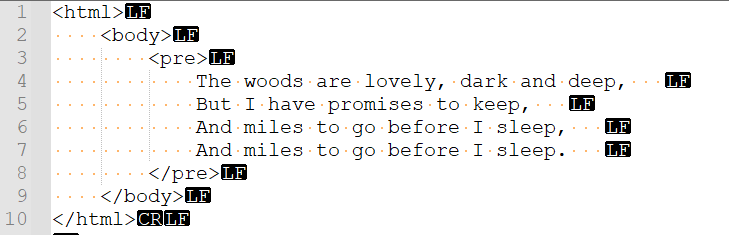
The output here includes three whitespaces at the end lines 4 to 7. 


So far, we have used only space character in all our examples. But tab character also represent whitespace and they are widely used for code indentation and formatting. How does the tab character behave when used within a text block? We will explore that in our next post.


Sample code used in this post can be downloaded from https://github.com/ashokkumarta/awesomely-java/tree/main/2021/03/Language-Features/Text-blocks/Techniques-for-including-trailing-whitespaces

Escape sequence in text blocks - \"

So we want to include three double quotes in the string contained within a text block. 

Say if we want the processed string to be as the one shown here

The woods are """lovely, dark and deep,
But I have """promises to keep,
And miles to go """before I sleep,
And miles to go """before I sleep.

We can use three double quotes with escape sequence like \""". Here \""" is not a new escape sequence. In fact, the escape sequence characters here is only \" - the escape sequence for double quote. The next two double quotes are the actual characters included in the string. 

The escaped double quote can be used for any of the three double quotes. The below code shows this. This code produces the same output string that is shown above.

public class Main {

    public static void main(String[] args) {

        String poemTextBlock = """
                The woods are \"""lovely, dark and deep,
                But I have "\""promises to keep,
                And miles to go ""\"before I sleep,
                And miles to go \"\"\"before I sleep.
                """;
        System.out.println("Text block: \n"+poemTextBlock);

    }
}

In this program, we escape the double quote at different positions in each line and for the last line, we use escape sequence for each of the three double quote characters. 

Where we need to include three or more continuous double quotes within a text block, we will have to use escape sequence so as to avoid having three continuous double quotes which will end the text block.

Below code includes five continuous double quote before the word 'lovely'

        String poemTextBlock = """
                The woods are \"""\""lovely, dark and deep,
                """;


Sample code used in this post can be downloaded from https://github.com/ashokkumarta/awesomely-java/tree/main/2021/03/Language-Features/Text-blocks/Escape-sequences-in-text-blocks-2

Friday, March 05, 2021

Escape sequences in text blocks - '\n'

All the escape sequences that can be used with the String, can be used in text blocks as well. 

But some escape sequences are not required to be used within text blocks. The actual character can be used directly instead. The most common escape sequence that can and should be avoided where possible in text blocks is the new line character '\n'.

At the end of each line of the multi-line string literal represented by the text block, new line character '\n' is included by Java compiler when processing the text block. 

We saw many examples of this in the previous posts.

There are a few tricks that we need to be aware of. First, lets see what happens if we explicitly include '\n' at the end of each line inside the text block

Below code shows a regular text block and the same with '\n' included at the end of each line 

public class Main {

    public static void main(String[] args) {

        String poemTextBlock = """
                The woods are lovely, dark and deep,
                But I have promises to keep,
                And miles to go before I sleep,
                And miles to go before I sleep.
                """;

        String poemTextBlockWithNewLine = """
                The woods are lovely, dark and deep,\n
                But I have promises to keep,\n
                And miles to go before I sleep,\n
                And miles to go before I sleep.
                """;

        System.out.println("Text block: \n"+poemTextBlock);
        System.out.println("Text block with new line: \n"+poemTextBlockWithNewLine);

    }
}

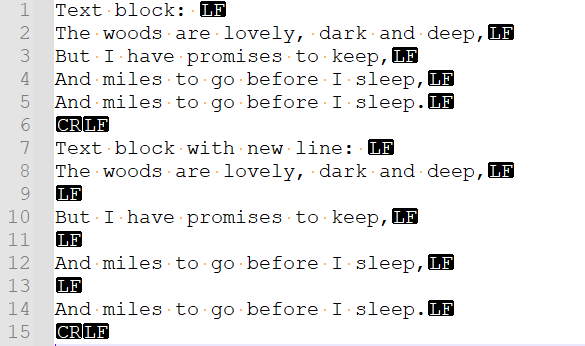
The '\n' at the end of each line introduces an additional new line between each of the lines and produces the output shown below


A new line character '\n' is not a whitespace and is not stripped away by the Java compiler when processing the text block.

Now consider the below snippet of code.  

Here we have two '\n' on the first line of text block, with a tab included in between.  

How does this get processed? There are four leading tab spaces in each of the lines of the text block, but between the two new line characters there is just one tab space. Does this impact the indentation of the lines making the text block. More specifically, will this modify the position of left margin for incidental whitespace stripping? 

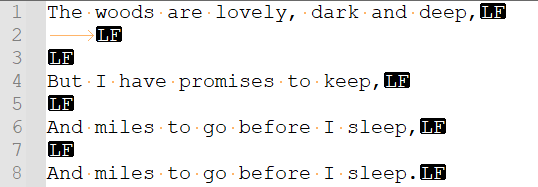
The above text block when printed has a value shown below


As you can see, the left margin is not affected by the whitespaces included between '\n' characters. Also note the presence of tab characters at the beginning of the 2nd line, indicating it is preserved and has not got stripped away in the processing. 

This is because the escape translation happens as a last step in the compilation process. 

The left margin gets identified and incidental whitespaces gets stripped away before '\n' escape sequence gets processed in our example. Escape sequence processing happens as a last step, making the '\n' characters include additional line feeds within the string. 

This is also the reason why we may have to use '\n' explicitly - to include empty line with specific no. of whitespace characters without impacting the margin of other lines within a text block. 

There is no other way of doing this when defining a text block.   


Sample code used in this post can be downloaded from https://github.com/ashokkumarta/awesomely-java/tree/main/2021/03/Language-Features/Text-blocks/Escape-sequences-in-text-blocks-1